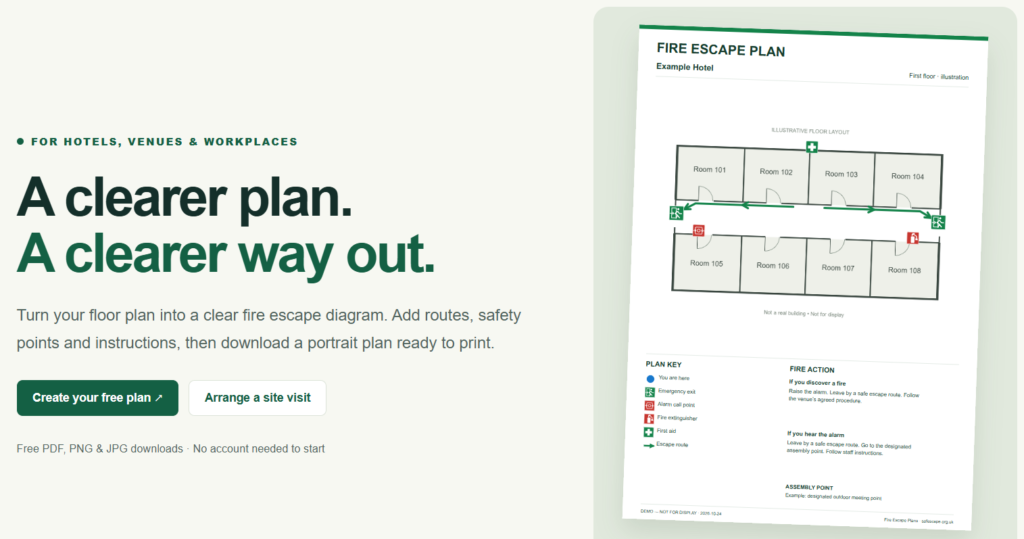
Ask a hotel guest how they would leave the building in an emergency and most will gesture vaguely towards reception. They arrived late, took the lift to their room and never looked at the corridor again. The same is true of delegates in a conference room or visitors to a function suite. A clear fire escape plan, mounted where people can actually see it, helps close that gap.
The safescape.org.uk website is there to make those plans easier to produce. It combines three things: a free, browser-based fire escape plan maker, an on-site service where the layout is recorded in person, and a library of practical guides written around hotels, event venues and workplaces. It is aimed at the people who have to put the plan on the wall rather than at fire engineers, and it is refreshingly open about where its tools stop.
In this guide we look at what the site offers, how the plan maker works step by step, what the guides cover and where the limitations lie, so you can judge whether it suits your venue.
This article is general information, not legal advice or a fire risk assessment. Check current official guidance and obtain premises-specific advice where needed.
What a fire escape plan is, and what it is not
One of the most useful ideas on the site is that three different documents do three different jobs, and that mixing them up is a common mistake.
- A fire risk assessment identifies hazards, the people at risk and the precautions needed.
- An emergency plan explains how the organisation will respond, including responsibilities, warning people and evacuation arrangements.
- A displayed fire escape plan is a diagram that helps people understand the building’s escape routes and relevant safety information. It usually combines a simplified floor plan, route arrows, exits, a location marker and short instructions.
Producing the diagram does not carry out either of the other two tasks. Safescape states this repeatedly, and the plan maker is described as a tool for presenting arrangements that have already been established rather than one that decides what those arrangements should be. That framing matters, because a neat drawing can give a false sense of security if the underlying assessment has not been done.
The legal backdrop in brief
The site’s guides focus on England and are clear that they offer general information rather than legal advice. A few points from them are worth knowing.
The Regulatory Reform (Fire Safety) Order 2005 is central to the fire-safety framework for non-domestic premises in England and Wales. Scotland and Northern Ireland have separate legislation and guidance, so readers there should look to their own rules. Responsibility sits with the “responsible person”, which can include employers, owners, landlords, occupiers and anyone else with control of the premises. According to the site’s summary of GOV.UK guidance, the Order also covers paying-guest accommodation, including bed and breakfasts and self-catering lets.
Recording duties changed on 1 October 2023. From that date, responsible persons covered by the Order must record their fire risk assessment in full and record their fire safety arrangements, and if someone is engaged to carry out or review the assessment, their identity must be recorded too. The old five-employee threshold for written records no longer applies, so older articles that mention it should not be relied on. Home Office guidance on the changes under Section 156 of the Building Safety Act 2022 is the place to check the detail.
Two further points from the site are practical rather than legal. First, there is no universal poster checklist: the guides warn against assuming every business must display an identical evacuation diagram, and say that what a plan needs to communicate depends on the premises and their arrangements. Second, the site cautions against unsupported labels such as “legally approved”, “certified compliant” or “fire service approved”. A plan reference, a revision date and a record of who checked the information are more useful than a badge nobody can substantiate.
Inside the free fire escape plan maker
The centrepiece of the site is its free plan maker. Downloads in PDF, PNG and JPG are free, no payment is needed and you do not need an account to start. Your work stays in your browser until you choose to save it online. The tool is arranged in numbered steps.
1. Upload your floor plan
You start with a base drawing in JPG, PNG or PDF format, up to 25 MB. If you upload a PDF, you select the single page you want to import. There is a button to rotate the base by 90 degrees, and the site advises doing this before you add any annotations. If you simply want to see how it behaves, there is a “Try an example” option.
As with any annotation tool, the quality of the result depends on the quality of the base. The site’s own guidance is to start with an accurate floor plan that represents the building as it is used today, and gives a nice example of the risk: an old letting brochure may show doors, partitions or room uses that have since changed.
2. Enter the plan details
The second step captures the information that identifies the plan: a plan heading, the venue name, the floor or location, a plan reference and a revision date. You also choose a portrait paper size, A4 or A3. The reference and revision fields are small but important. They are what let you work out later which version of a plan is displayed where, and whether it has been superseded.
3. Add symbols and routes
The symbols and routes panel gives you tools to select items, draw a route, add text and finish a route. You mark the agreed escape routes, exits, alarm call points and other useful safety locations, such as first aid and firefighting equipment. Items can be dragged into position, and Undo and Redo are available.
A selected item has its own controls. For symbols you can change the size and rotation (0, 90, 180 or 270 degrees), edit label text, and duplicate or delete the item. For routes you can adjust the thickness, and clicking a route reveals its editable bends, which you drag to reshape the line. This is helpful when a route has to wind through a corridor and turn at a doorway rather than cut straight across a wall.
The tool also supports a “You are here” entry in the key. This is designed for a blue sticker added after printing, which we explain in the section on floor masters below.
One caveat appears right in the interface. The pictograms are original, illustrative symbols and are not offered as a certified ISO symbol library. If your project specifically requires a standard symbol library, the site says you should arrange an appropriate review and use suitably licensed assets.
4. Write the fire action instructions
The editor includes three instruction sections: what to do if you discover a fire, what to do if you hear the alarm, and the assembly location. Each section is limited to 250 characters and five printed lines, and the tool invites you to check the preview. That constraint is a quiet piece of good design. Instructions on a wall plan are read by people in a hurry, and a cap on length stops a notice turning into a wall of small print. The wording should always follow the venue’s agreed procedures rather than generic text.
5. Download the finished plan
PDF and image downloads use your chosen portrait paper size at approximately 300 dpi. The site reminds you to check the routes, instructions and printed legibility before display, and, for a floor master, to add and verify the blue location sticker on every installed copy.
Saving your work
There are three ways to keep your work:
- Editable project file. Download it to your computer and reopen it later to continue editing.
- Online project. Save online using a project code and a password of at least 12 characters. Leave the code empty for a new save; to reopen, enter the code and password. The site is plain about the trade-off: online saving uploads the complete plan to its server, and there is no email recovery, so you should keep a downloaded project copy as well.
- Browser draft. Your browser also keeps a working draft where storage is available, but browser storage can be cleared, so it should not be treated as a backup.
The terms page adds that online saving is not a guaranteed backup service and that there is no automated password recovery. A sensible habit is to keep two things: the editable project, which supports future changes, and the exported file, which records exactly what was issued.
What the tool does not do
The terms and the tool itself spell out its limits. It does not calculate safe capacities, validate travel distances, assess doors or decide whether a route is safe, and it does not certify compliance. You are responsible for checking the accuracy and suitability of what you enter, and for using drawings you have permission to use. It is a drawing aid for established information, not a judgement on a building.
The floor master and the blue “You are here” sticker
One of the most practical ideas on the site is the floor master. For suitable hotel layouts, you prepare one plan for a floor, print as many copies as you need and add a blue “You are here” sticker at each display position. That saves redrawing a near-identical plan for every corridor or room.
The site is careful about the limits of this approach. A shared master is not automatically suitable at every location. A rotated view or a separate version can communicate more clearly, and you should avoid including a route that only makes sense from one particular room. The floor, room, sticker position and orientation all need to be checked on every installed copy, because a sticker can end up on the wrong room even when the drawing itself is accurate. Because the sticker is not part of the printed drawing, the key should explain it, and the sticker should not cover a door, exit or arrow.
Site visits for venues without an accurate plan
Not every venue has a reliable floor plan. For those that do not, Safescape offers a site visit service in which the layout is recorded in person and relevant locations, such as exits, alarm call points, first aid and firefighting equipment, are logged. The display plans are then prepared using the venue’s agreed fire arrangements.
The process runs in five stages:
- Tell them about the venue, including the location, approximate size, floors and any existing drawings.
- Agree scope and quote. Access, what will be recorded and which plans are needed are confirmed before booking.
- Record the layout and locations. You arrange access and a knowledgeable contact who can help identify the relevant facilities.
- Review the draft. The person responsible for the premises checks the routes, instructions and locations against the agreed arrangements.
- Receive your files. Portrait PDF and image outputs are supplied along with an editable project for later updates.
For hotels, the service can prepare floor masters suited to blue location stickers. For event venues, you should say whether you need a fixed building plan or plans for particular room configurations. To prepare, have any existing drawings, the relevant fire arrangements, approved instructions and the assembly location ready, and flag recent alterations or areas where information needs clarifying.
Prices for site visits are not published; they are quoted individually, with travel, availability and deliverables confirmed in the quotation. The site is equally clear about scope: a visit to record the layout and prepare graphics is not a fire risk assessment, a compliance inspection or a fire-engineering design service. Assessment and route-design decisions need appropriate competent advice. You can contact the service on 0114 383 0711 or at info@safescape.org.uk.
The guides library
Beyond the tools, the site publishes a set of practical guides written for hotels, event venues and workplaces. At the time of writing they carry a review date of 24 October 2026, focus on England and link to official sources such as GOV.UK, the Home Office and the HSE. Eight guides are listed, and several are worth a closer look.
What should a fire escape plan include?
This guide is a presentation checklist, and it begins with an important reminder: drawing symbols does not provide real-world arrangements. It points to GOV.UK guidance covering usable and clearly identified routes, sufficient exits, doors that open easily, emergency lighting where needed, training and a safe meeting point. The drawing then needs to identify the venue and floor, show the walls, doors, corridors and stairs needed to understand the routes, and draw the agreed routes through actual doorways rather than accidentally across walls. A clear “You are here” marker, a legend that explains only the symbols actually shown, premises-specific instructions, an assembly location (with an inset map if it lies beyond the main drawing), a plan reference and a revision date complete the list. It also recommends printing a test at the final portrait size and asking someone who knows the premises to verify the result.
Hotels and guest accommodation
Hotel guests may arrive late, explore very little and be asleep when an alarm sounds, so their information should make sense without any knowledge of staff terminology or service areas. The guide draws on the Home Office guide for sleeping accommodation, which discusses guest fire action notices and, for larger or more complex premises, notices accompanied by an escape-route plan. It also covers information for guests who do not speak English as a first language, and recommends having translations checked so each language communicates the same procedure. Guest notices and staff equipment inventories should be kept distinct, so a bedroom notice does not turn into a crowded maintenance drawing. It also recommends keeping a list of display locations and the master revision used for each.
Event venues and function rooms
A function room can host a dinner, an exhibition and a conference in the same week, with the walls staying put while the routes between tables, stages and displays change. The guide’s advice is to check the event layout against the venue’s agreed arrangements before reusing a diagram, and to ask the organiser for the proposed layout early. It refers readers to HSE guidance on proportionate event emergency planning and to separate Home Office assessment guides for small and medium places of assembly and for large places of assembly, the latter covering places where more than 300 people could gather, such as conference and exhibition centres. It specifically warns against deriving capacity from floor area alone or treating the number of drawn seats as approval.
Accessible evacuation information
A printed plan can help one person and be inaccessible to another, and large text and strong contrast cannot turn a visual map into a complete solution. This guide encourages starting with the practical needs of the people likely to use the premises, including disabled people, rather than adding an accessibility symbol at the end. It recommends marking an accessible route, refuge or evacuation facility only after confirming its purpose in the actual arrangements, and warns against labelling a refuge as a final assembly point or implying that someone can simply be left there. It advises using plain language, not relying on colour alone (pairing the blue marker with an explicit “You are here” entry in the legend) and keeping personal information private: public diagrams should not identify individual guests or disclose medical or support needs.
Checking, printing and updating
This guide sets out a simple document-management workflow. Check information before appearance, by walking through the drawing with someone who knows the premises and resolving discrepancies before polishing the design. Print a proof at the intended A4 or A3 size and inspect the paper as well as the preview, since printers can add margins or alter scale. If a plan is crowded, simplify it, choose a larger sheet or prepare a clearer view rather than shrinking everything. Record each installed copy, use descriptive filenames with the venue, floor and revision instead of several versions called “final”, and review plans whenever the layout, exits, equipment, room use or agreed instructions change. Remove superseded prints and replace shared digital copies as well. The site is explicit that this is a suggested workflow, not a statutory inspection timetable.
Where a good base floor plan fits in
A recurring theme across the site is that good information comes before good drawings. Everything the plan maker adds, from routes to symbols to instructions, sits on top of the base drawing you upload. If that drawing is out of date, distorted or missing rooms, no amount of careful annotation will rescue it.
That is where accurate, current floor plans earn their place. For hotels, holiday lets, event spaces and other commercial premises, a clean and correctly measured floor plan is the natural starting point for an escape plan, and it can be reused across other tasks such as marketing and property records. If your existing drawings are old brochure sketches or architects’ plans that no longer match the building, commissioning a fresh plan first is likely to save time later.
Strengths and limitations
Strengths
- A genuinely free tool, with free PDF, PNG and JPG downloads and no account needed to start.
- Portrait A4 and A3 output at approximately 300 dpi, suited to wall display.
- Practical editing touches, such as editable route bends, symbol rotation and size controls, and duplicate and delete.
- Character and line limits on the fire action instructions that keep notices readable.
- The floor master approach, which can save considerable time for hotels with repeated layouts.
- Guides that carry review dates, link to official sources and are candid about what a drawing cannot do.
- Transparent terms that state exactly what the editor does not check.
Limitations to keep in mind
- The tool needs an existing base drawing; it does not measure a building or create a floor plan.
- The symbols are illustrative and are not a certified ISO 7010 library, so projects that specify a standard symbol set will need licensed assets.
- The editor does not assess routes, doors, travel distances or capacities, and cannot certify compliance.
- Online saving has no email recovery and is not a guaranteed backup, so you must keep your own downloaded project file.
- Plans are produced in portrait format, one floor per plan.
- The guides focus on England, so readers in Scotland and Northern Ireland should consult their own legislation and guidance.
- Site-visit prices are not published and must be requested.
Practical tips for getting the best result
- Settle the arrangements first. Gather the fire risk assessment outcomes, agreed routes, approved instructions and the assembly location before you open the editor.
- Use an accurate, current base plan. Check it against the building as it is used today, including recent alterations.
- Walk it with someone who knows the premises. Confirm room names, doors, stairs, exits and marked locations, and resolve any uncertainty before polishing.
- Make sure routes pass through real doorways. Check that no line accidentally crosses a wall.
- Keep the key honest. Only explain symbols that actually appear, and add the “You are here” entry if you use blue stickers.
- Print a proof at final size. Check contrast, labels, margins and that nothing is cut off.
- Verify every installed copy. For a floor master, confirm the sticker position, room and orientation on each one.
- Keep records. Use clear filenames, a plan reference and a revision date, and keep both the editable project and the issued file.
- Review when things change. Update or replace plans after refurbishment, a new event configuration or any change to arrangements, and remove superseded prints.
Which route is right for you?
- If you already have an accurate floor plan and agreed arrangements, the free plan maker is the quickest place to start.
- If you have no reliable plan or want the layout and locations recorded in person, ask about a site visit and request a quotation.
- If you are unsure what your premises require, start with your fire risk assessment, the responsible person and the official guidance before drawing anything.
- If you operate several rooms with the same layout, such as hotel corridors, consider the floor master approach.
- If you host events in changing layouts, plan for the actual configuration each time rather than reusing the last printout.
Frequently asked questions
Is the online fire escape plan maker really free?
Yes. You can create a plan and download PDF, PNG or JPG files without payment. Site visits and commissioned preparation are quoted separately.
Do I need to create an account?
No. You can start without one. To save online you set a project code and a password of at least 12 characters, and there is no email recovery, so keep a downloaded project copy.
Does the tool produce a fire risk assessment?
No. It presents the layout, routes and information you supply. The premises’ fire risk assessment and emergency arrangements must establish what is appropriate.
What file types can I upload and download?
You can upload JPG, PNG or PDF files of up to 25 MB, selecting one page from a PDF. You can download PDF, PNG or JPG files at portrait A4 or A3 size.
Can I make changes later?
Yes. Download an editable project file, or save online with a project code and password. Your browser also keeps a working draft where storage is available.
Can I use it for a hotel or event venue?
Yes. Use current drawings and the venue’s agreed arrangements. For events, check the actual room configuration; for hotels, verify every displayed location marker.
Are the symbols ISO certified?
No. The pictograms are original and illustrative, and are not offered as a licensed or certified ISO 7010 library.
Does a site visit include a fire risk assessment?
No. A visit to record the layout and prepare graphics is not a fire risk assessment, compliance inspection or fire-engineering design service.
Im summary
Safescape.org.uk does something simple and useful: it takes a task that many hotels, venues and workplaces find fiddly, producing a clear and consistent escape diagram, and makes it free and approachable. The plan maker’s attention to detail, from editable route bends and instruction limits to the floor master and blue sticker workflow, is well suited to real display conditions. Just as importantly, the site is consistently honest about what a drawing is and is not. Its guides keep returning to the point that the diagram communicates arrangements; it does not create them.
The best way to use it is as the last step in a sequence: complete a proper fire risk assessment, settle the arrangements, start from an accurate and current floor plan, then use the tool to turn all of that into something people can read at a glance. Check the plan against the building, print a proof, verify each copy and review it whenever something changes.
You can try the plan maker and read the guides at safescape.org.uk.
If you need a clean, accurate floor plan elsewhere in the UK as the starting point for your own escape plan, 360 Virtual View produces floor plans throughout the country. Get in touch to discuss your property.
This article is general information, not legal advice or a fire risk assessment. Check current official guidance and obtain premises-specific advice where needed.

0 Comments Leave a comment