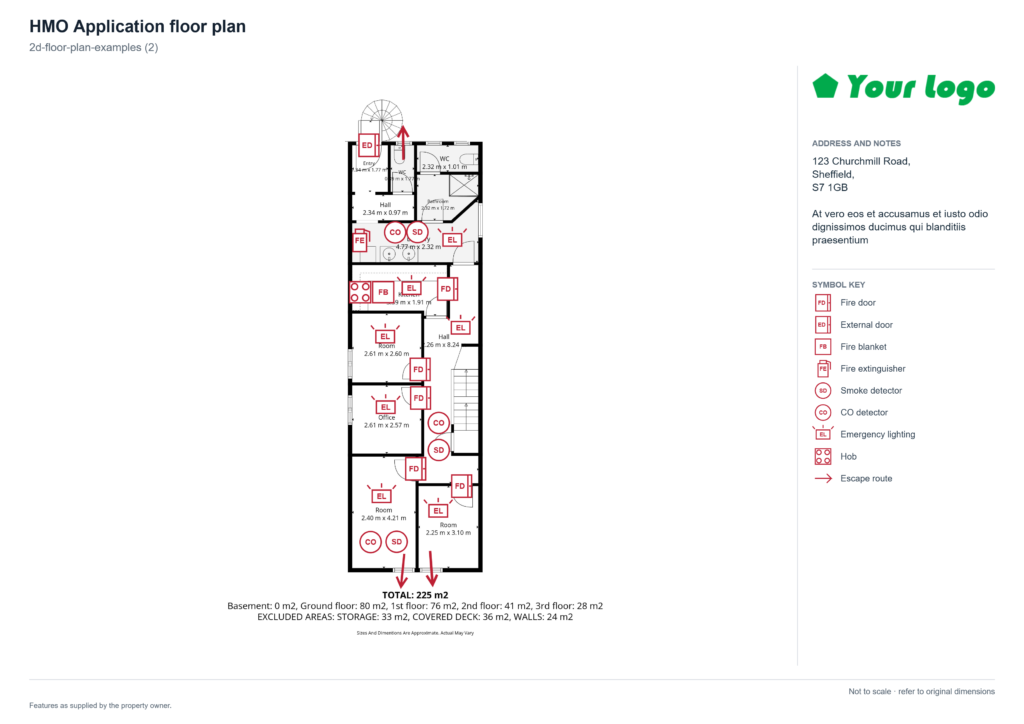
Whether you are listing a flat, preparing a holiday let for its first guests or putting together an HMO licence application, one document does more work than almost any other: the floor plans. A good floor plan explains a property in seconds, answers questions before they are asked and, in the case of an HMO licence application, can be the difference between a smooth approval and a returned form.
floor-planner.co.uk is a Sheffield-based website that approaches this from two directions at once. It offers a free, browser-based enhanced floor plan builder that lets anyone add symbols, room labels, notes and escape routes to an existing plan, and it sells on-site property services, including 2D and 3D floor plans, Matterport 3D tours and CAD production. HMO application plans are available on a quotation basis.
In this guide we take a close look at what the site offers, how the builder works, what it is genuinely good at and where its limits lie, so you can decide which route suits your property and your paperwork.
What is are “enhanced” floor plans?
A basic schematic floor plan shows the basic layout of a property: walls, doors, windows and how the rooms connect. An enhanced floor plan takes that base drawing and layers practical information on top. Think room names and uses, symbols for fixtures and safety equipment, written notes, the property address, a floor name and a logo, all arranged on a clean, presentable sheet.
That extra layer is what turns a drawing into a working document. For a letting agent it might mean a branded sheet that matches the rest of their marketing. For a landlord it might mean a plan that shows exactly where the smoke alarms and fire doors are. For an HMO applicant it means a plan that carries the information a council officer needs to assess the application.
Floor-planner.co.uk is built around this idea. Its homepage is not a brochure; it is the tool itself.
Inside the enhanced floor plan builder
The builder runs in your web browser, and the site states that your files stay in the open tab unless you choose to save them online. The workflow is laid out in three numbered panels.
1. Upload your floor plans
You begin by uploading an existing plan. The builder accepts PDF, PNG and JPG files of up to 30 MB each, and you can upload more than one, which makes it practical for multi-storey properties where each floor needs its own sheet. This is an important point to understand: the builder is an annotation tool, not a drawing or surveying tool. You need a base drawing to start from, whether that is a schematic plan produced after a site visit, an architect’s drawing or a tidy sketch.
2. Add symbols, labels and notes
Once a plan is loaded, you choose a symbol and click the plan to place it. Placed symbols can be dragged into position, and the toolbar includes Select, Undo and Redo controls along with fit-to-screen and zoom, which makes it easy to correct mistakes and work precisely on a busy drawing. Further conveniences include deleting a selected item with the Delete key and nudging items with the arrow keys, with Shift moving them further.
Escape routes get their own treatment. You click each turning point along the route and double-click to finish, pressing Escape if you want to cancel. Anyone who has tried to draw a clear, bent escape route in a generic image editor will appreciate how much simpler that is. The tool also supports room labels and notes, so each space can be named and its use recorded.
3. Set up the sheet
The third panel controls the finished document:
- Plan title, address and notes, so the sheet identifies the property on its own.
- Floor name, such as Ground Floor or First Floor.
- Paper size and orientation: A4 or A3, in landscape or portrait.
- Your logo, uploaded so the sheet carries your branding.
- Black and white background, helpful for printing and for submissions that need to be clean and legible.
- Trim blank outer margins, which tightens the drawing on the page so it uses the sheet well.
A short note on the page makes an important point: original measurements are preserved, but the sheet is not to a calibrated print scale. We come back to why that matters below.
Exporting and saving your floor plans
When you are finished, you can download the current floor as a PNG or JPG, or export all floors together as a single PDF. The multi-floor PDF is particularly handy for HMO applications, where plans are usually submitted floor by floor.
Saving is flexible. You can create an account to save plans online, in which case they are private to your account, or you can download an editable copy to your computer that contains the original drawing, symbols and notes, and open it later to carry on editing.
One practical warning from the site itself: your email address is your sign-in ID, and this version does not send verification or password-reset emails. Instead, you are shown a recovery key once, at sign-up, and you should store it in a password manager. If you plan to rely on online saving, take that instruction seriously. Downloading an editable copy as a backup is a sensible habit either way.
What the builder does not do
To set expectations honestly: the builder will not measure a property, draw walls for you or produce a scaled architectural drawing. It also does not verify that a plan satisfies any council’s requirements. Its strength is turning a base drawing into a clear, labelled, professional-looking sheet quickly and at no cost.
HMO application floor plans
Why HMO applications need good plans
A house in multiple occupation (HMO) is, broadly, a property shared by people who are not part of the same household and who share facilities such as a kitchen or bathroom. In England, larger HMOs generally require a mandatory licence, and many councils also run additional or selective licensing schemes covering smaller shared houses. Scotland, Wales and Northern Ireland each have their own regimes. The detail varies by location, so always confirm the current rules with the relevant local authority.
What is consistent is that licensing applications are supported by floor plans. The council uses them to check room sizes and uses, to see how occupants would escape in a fire and to confirm that amenities and fire safety measures are where the application says they are. Councils often warn that poorly prepared plans lead to applications being returned or delayed.
What councils typically ask to see
Requirements differ from council to council, which is why you should always obtain your own authority’s checklist. As a guide, published council guidance commonly asks for some or all of the following:
- A plan of every storey, often on a single side of A4 per floor, with staircases clearly marked.
- Room dimensions in metres, usually with floor areas for sleeping rooms. Drawings generally need to be representative of the layout rather than drawn to a precise scale.
- Clear labels describing each room’s use, such as bedroom, kitchen or living room.
- Doors, windows, entrances and exits, and internal and external walls.
- Locations of kitchens, bathrooms, showers, sinks and similar facilities.
- Fire safety features such as smoke and heat detectors, call points, fire blankets, emergency lighting and fire doors with their ratings.
- Escape routes, often required to be shown in red where they are complex.
- Areas where the ceiling height drops below 1.5 metres, since low areas generally cannot count towards room size.
Room size is not a trivial point. In England the national minimum floor areas for sleeping rooms in licensable HMOs are 6.51 square metres for one adult, 10.22 square metres for two adults and 4.64 square metres for one child under ten. Plans that show accurate dimensions and floor areas let officers check these figures quickly. Some councils publish their own symbol keys or abbreviations, and a few add local requirements, so the key on your plan should match what your council expects or include a clear legend of its own.
How floor-planner.co.uk supports HMO plans
The site approaches HMO plans in two ways.
Do it yourself with the free builder. If you already have a base drawing, the builder lets you add room labels, symbols, notes and escape routes, choose A4 sheets, apply a clean black and white background and export the result floor by floor or as one PDF. For a landlord who has measured up themselves or has an existing drawing, that can cover much of the final presentation work. Check that the symbols available match your council’s key before you rely on it for a submission.
Commission a professional plan. The site’s 2D floor plans page explains that HMO application plans are produced after an on-site visit and can show agreed room uses, occupancy information, escape routes and fire-safety features. Because every council’s requirements differ, these plans are priced by quotation, and the site asks you to send your council’s requirements before the visit so that the right detail is included. That advice is well worth copying: sending the checklist before the survey avoids costly return visits.
What an HMO plan can and cannot do
Floor-planner.co.uk is refreshingly clear on this point. A floor plan records the layout and the agreed information; it is not a fire risk assessment and it is not a guarantee that a licence will be approved. Requirements vary by council and by property, so landlords should check current rules and take specialist advice where needed. We would add our own recommendation: treat the plan as one part of a complete application, alongside the fire risk assessment, certificates and other documents your council asks for.
The wider service range
Although the builder is the headline feature, the site is also a working property services business. Here is what else is on offer.
2D schematic floor plans
Top-down drawings produced after an on-site visit, showing how rooms connect, where doors and windows sit and the dimensions that help people understand the space. The site lists estate and letting agents, landlords, property managers, homeowners, holiday-let owners and HMO operators as typical customers. The plans are schematic: they explain layouts, but they are not construction drawings. If you need a particular measurement tolerance or a scale drawing for design or construction, you should say so before booking.
Colour 3D floor plans
A colour 3D floor plan shows rooms and their relationships in one easy-to-read image, usually from above at an angle. It is aimed at holiday villages, holiday parks, lodge businesses, holiday lets, hotels, estate agents and developers, and works well on property pages and in booking information because it answers practical questions such as where the bedrooms are and which areas are shared. It is a rendered image rather than an interactive experience, and the level of furnishing and styling is agreed before production.
Matterport 3D tours
For a more immersive option, the site captures properties with a Matterport camera and supplies an interactive tour that visitors can explore in a browser, shared by link or embedded on a website. It is suited to hotels, holiday accommodation, event venues, factories and holiday parks. The site is candid that a tour supports understanding but does not replace an accessibility assessment or technical inspection.
CAD production
For architects, designers, surveyors, facilities teams and contractors, the site produces CAD files from on-site capture, including 2D and 3D DWG, Collada (.dae), FBX and OBJ. Compatibility with software such as AutoCAD, Revit, Archicad, SketchUp and 3ds Max is agreed in advance. The site points out that a CAD or mesh file is not automatically a native BIM model, and that critical dimensions must be checked before design, manufacture or construction.
Pricing at a glance
The following base prices were listed on the site at the time of writing (October 2026) and are quoted without VAT. Always confirm current prices and scope before booking.
| Property size | 2D floor plan | Matterport 3D tour |
| Studio / 1-bedroom apartment | £45 | £250 |
| 2–4 bedrooms | £60 | £300 |
| 5–6 bedrooms | £75 | £350 |
| 7–9 bedrooms | £90 | £450 |
A few further details complete the picture:
- Properties over 450 m² attract an additional £25 on 2D plans.
- A colour 3D floor plan is an indicative estimate of £65 on top of the schematic plan price for a standard-sized house.
- Matterport prices include the first year of hosting; hosting thereafter is £90 per year, and continued online access depends on active hosting.
- HMO application plans, commercial premises, CAD production and other unlisted work are quoted individually.
- Travel and client-related waiting are charged at £10 per 15 minutes, plus mileage at 45p per mile. Return travel is quoted from south-west Sheffield and charged once per visit.
That last point deserves attention. The service is based in Sheffield, so for properties a long way from South Yorkshire travel costs can become a significant part of the bill. In that situation the free builder, or a provider closer to the property, may make more sense, and it is why the site invites you to ask for a quote covering your location.
Who benefits most?
- Landlords and HMO operators who need to turn a base drawing into a presentable, annotated application sheet.
- Letting and estate agents who want branded plans with consistent presentation.
- Holiday-let owners and holiday parks who want guests to understand layouts and accommodation types before they book.
- Property managers who need a tidy visual record of room uses and fire safety arrangements.
- Architects, designers and contractors who want a digital starting point for an existing space.
Strengths and limitations
Strengths
- A genuinely useful free tool, with no need to learn CAD software.
- Thoughtful features for application-style sheets: A4 and A3, per-floor export, a combined PDF, a black and white option and logo upload.
- A dedicated escape-route tool that makes a fiddly job quick.
- Clear, transparent price lists and unusually frank statements about what each product is not.
- A privacy-conscious approach, with files staying in the browser unless you choose to save online.
Limitations to keep in mind
- The builder needs an existing base drawing; it does not create one.
- Output is not calibrated to a print scale, so it should not be used for scaled or construction purposes.
- Accounts do not use email verification or password reset, so safeguarding the recovery key is essential.
- A drawing does not confirm compliance, and you should check what your council expects, including its preferred symbols.
- On-site services are priced from Sheffield, so travel costs matter for distant properties.
Practical tips for a smooth HMO application
- Get your council’s plan guidance first. Many councils publish a checklist, an example drawing and a symbol key. Build your plan around it.
- Start with an accurate base drawing. Everything the builder adds rests on the quality of the plan you upload, so check room dimensions and floor areas before annotating.
- Label every room by its use, and make sure the labels match what you state on the application form.
- Mark escape routes clearly and check them against the real property, including doors that must open without a key.
- Include a key. If you use abbreviations or symbols that differ from your council’s, add a legend.
- Keep one sheet per floor and make the lowest floor easy to identify, with staircases clearly shown.
- Save an editable copy. Layouts and occupancy details change, and you will want to update the plan rather than start again.
- Review before submitting. Compare the finished sheets against the council’s checklist line by line.
Which route is right for you?
- If you already have a base plan and only need annotations, the free builder is the quickest place to start.
- If you need a plan surveyed, a professional on-site 2D plan is the better option, and for an HMO you should request a quotation and supply your council’s requirements.
- If you want to market a holiday let or accommodation, consider a colour 3D floor plan, a Matterport tour or both.
- If you are designing or refurbishing, ask about CAD production and be specific about your software and required tolerances.
Frequently asked questions
Is the enhanced floor plan builder free?
Yes. The site describes it as a free enhanced floor plan builder on its 2D floor plans page.
Can I create a floor plan from scratch with it?
No. You upload an existing plan as a PDF, PNG or JPG and then add symbols, labels, notes and escape routes. It is an annotation tool rather than a drawing tool.
What file types can I export?
PNG and JPG for the current floor, and PDF for all floors.
Is the output to scale?
Original measurements are preserved, but the sheet is not to a calibrated print scale.
Will an HMO plan guarantee my licence is approved?
No. A plan records layout and agreed information. It is not a fire risk assessment or a guarantee of approval, and requirements vary by council.
How much does an HMO application plan cost?
HMO plans are priced by quotation. Send your council’s requirements and your location so the cost can be confirmed before you book.
Do I need an account to use the builder?
You can use it without saving online and keep an editable copy on your own computer. An account lets you save plans online, privately.
Can a Matterport tour be embedded on my website?
Yes. A tour can be shared by link or embedded in a compatible website.
In summary
Floor-planner.co.uk combines two things that are often kept apart: a practical, free tool that anyone can use to polish and annotate a plan, and a straightforward on-site service for those who need a plan produced, whether that is a 2D drawing, a colour 3D plan, a Matterport tour or CAD files. For landlords wrestling with HMO paperwork, the builder’s escape-route tool, A4 and A3 sheets and per-floor export are all well matched to what councils typically look for, while the site’s honesty about its limitations, from scale to compliance, is a welcome change from the usual marketing claims.
As always, the golden rule with any HMO application is to check your own council’s current requirements before you draw a single line. Get that right, start from an accurate base plan and the enhanced sheet that comes out the other end can make the whole process considerably smoother.
You can try the builder and see the full range of services at floor-planner.co.uk.
If you need a surveyed floor plan elsewhere in the UK, 360 Virtual View produces floor plans throughout the country. Get in touch to discuss your requirements.

0 Comments Leave a comment